 (1).png)
Transition: (Almost) Every Streamer Got it Wrong
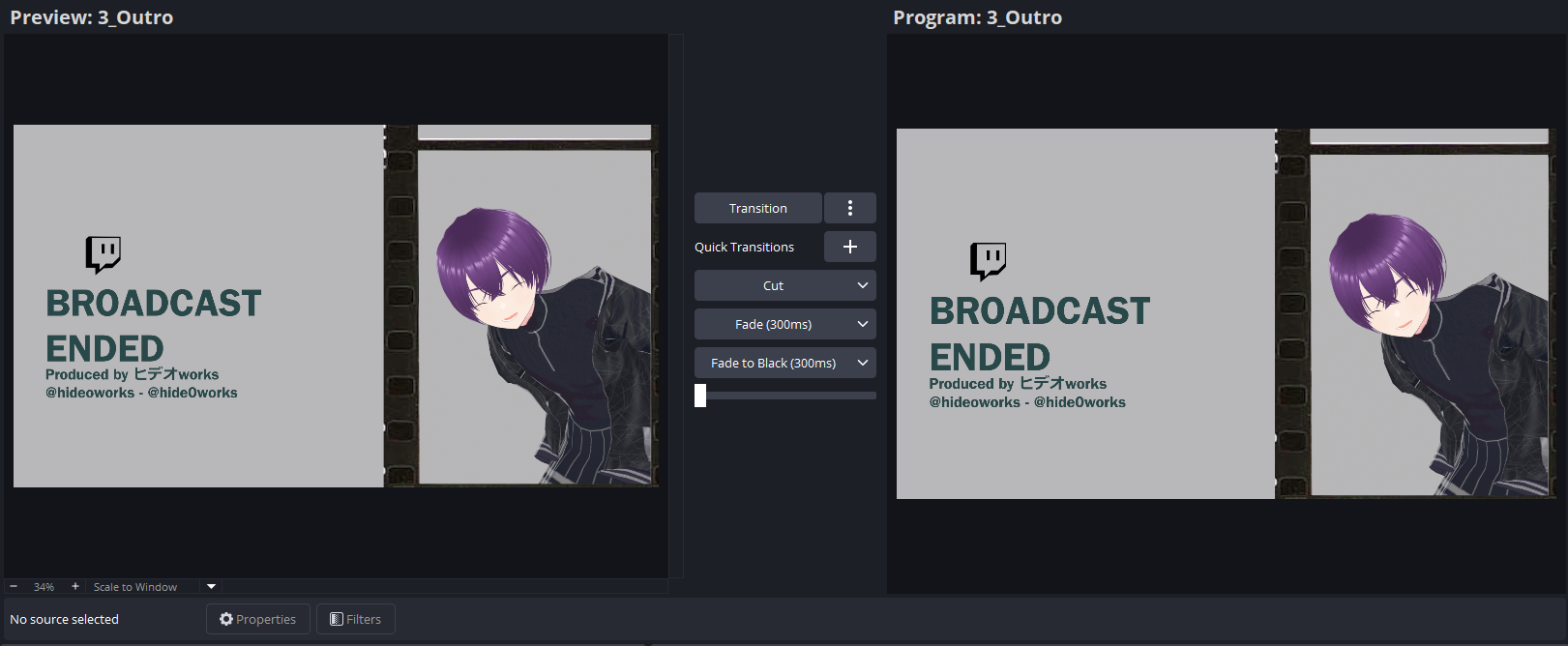
Tired of watching livestreamer using the same transition over and over everytime they're changing scene? So do we! And the ones that really grinds our gear, are the ones that just use stinger transition as default. Which, if you move scenes a lot, like from chatting scene, then to screen capture, then back to chatting, over and over. Imagine how fatiguing it is! We know you did spent good amount of money on those custom animation, but don't shove it to your viewer everytime!
You know what's even funnier? We'll come back here in a second. But if you familiar with OBS Studio, there is a dock called "Scene Transitions", where it has a dropdown containing transition preset you had set before, that you can easily change on the fly. That's why that dock exist in the default layout of OBS Studio. Because you meant to change it! And if you had a Producer or Technical Director like ones in the telly, you had Studio Mode enabled and behold, ANOTHER TRANSITION CONTROL, WITH MORE DETAILS YOU CAN FINETUNE. Now, we understand why one only use a default transition and calling it a day, most streamers are just one-man crew, with them also being the performer. We get that! But transition is more important than you might originally thought, and how we encourage you to at least play around a bit!
The Importance of Transition
In his book, "Multimodality: a social semiotic approach to contemporary communication", Kress (2010) explains how in every component, or "modal" in this theory model called, exist in a media, is serving certain purpose and meaning. The multimodal model in communication research emphasize this to build a whole, complete message, in the media that being used. Now, why do we talk about this? The reality is, in multimodal communication model, the "modal" in question can be acknowledged so long as a group of individual believes in its importance.
One of the examples given, if font can be considered as a modal. The justification is that different font styles is used in different theme and setting of a design, that includes how big they are, whether it's in bold, italic, or underline, all carries meaning in its own way. And by the graphic designer communities acknowledging it carries meaning, therefore one can safely categorize it as a modal to analyze. Similar case with transition!
We highly recommend this video from Taran Van Hemert titled "Boring is Better: Video Transitions - World’s Greatest Guide". One might thought video editing and livestreaming are two different kinds of beasts. But, we disagree as it has the same foundation of workflow, with pre-production, production, and post-production, where the difference is where some of the workload being offloaded to another phase. Shifting back, Taran said "Transitions are like a whole new language you need to learn...", and that is true. A cut transition carries different meaning to fade, wipe, or stinger. And the placement of transition does matter to make a coherent show for your livestream.
Understanding Transition in Live Broadcast
Now, we can go on forever talking about many kinds of transition. But let's keep it at the default ones built in the OBS Studio such as: Cut, Fade (if you're a video editor, it's a dissolve transition, don't ask me why), Slide, Wipe, and everyone's favorite, Stinger.
- Cut: Switching from one scene to another directly with no transition. It's quick, not fatiguing so it can be used often.
- Fade: Transition with one scene fading into another. More subtle, but more numbing if used over and over.
- Slide: Sliding one scene being replaced with another, whether horizontally or vertically. It is emphasizing more due to how it being animated and can be very fatiguing if used too much.
- Wipe: A combination of Fade and Slide that can works horizontally or vertically. A more subtle transition than Slide but still has more things happening than normal Fade.
- Stinger: Essentially putting a transparent video to cover the Cut from one scene to another. Depending on the stinger video used, but it still tends to be more fatiguing.
Now, We've emphasized the term transition fatigue a lot, and that's for a good reason. Even in video editing, we want to avoid viewer experiencing fatigue while watching. Here, we'll be referencing this part of Taran's video to give rough idea of how we're placing these transitions. We also will referencing my own flow of livestream to potray how to convert it into actual flow of a livestream show.
Usually, you starts with Intro (or starting soon/be right back screen), move to Facecam to give an intro, then to the Game Capture scene, there might be some reaction we want to do and we've prepared some scenes with filter, then back to Facecam to finish the stream, and finally to Outro (or stream ending screen). Now with this flow, you can prepare about 3 transition to use and when to change them.
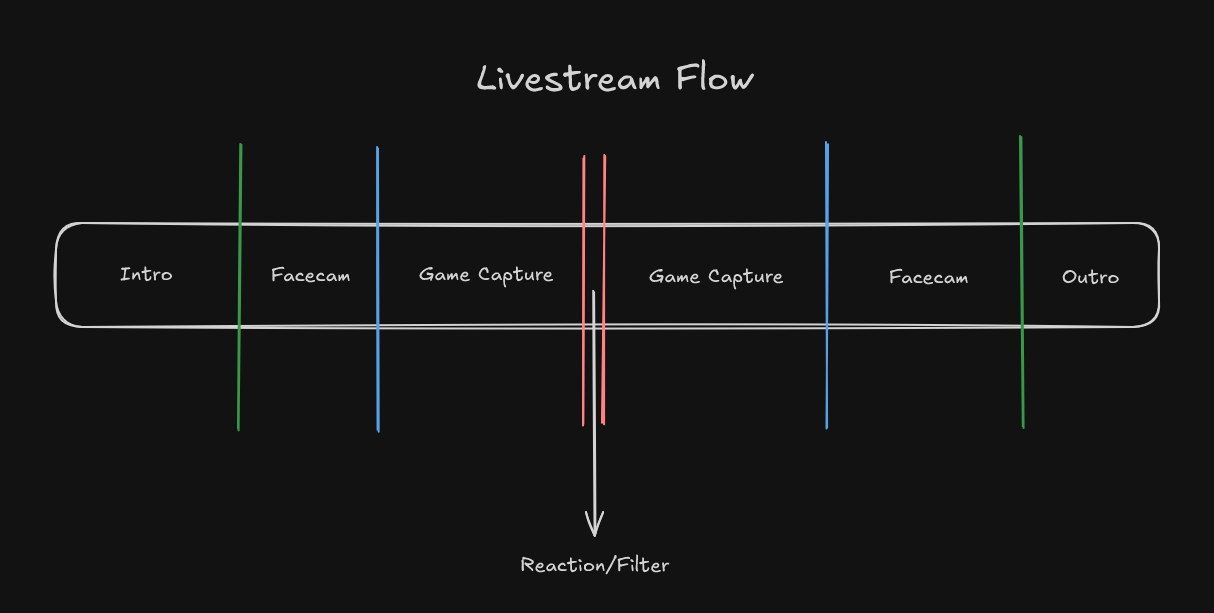
Starting with Intro to Facecam. I want it to be a statement, to attract the idle waiting viewer to actively watch the stream. Therefore, I use Stinger transition, to attract the idle viewer, and also a good place to put your identity or branding. Then from Facecam to Game Capture, I want something more subtle, as we are already entering the show, but it should still separating the two scenes well. So, I'd use either Fade or Wipe, whichever I feel like it. Then from and to Filter scenes, I want it to be quick, as I'm reacting something that has crucial timing and can be used often. Then I'll use Cut transition for it. The rest follows similar system. With this, not only it's variative, making the show dynamic to watch, but still not fatiguing nor numbing when a viewer focused on it.
Now this workflow has exist since forever in broadcasting landscape. Normally in TV studio, a lot of signal from many cameras in the studio, being transferred to be processed in a video mixer. And the video mixer indeed has the ability of what we just explained just like in OBS Studio. Switching signal sources, applying transition, and such by the Technical Director as its operator. Now if you want to learn more, we highly suggest watching Cathode Ray Dude's on "What the heck is a video mixer?". It's a great reference if you want to retrofit some studio-level workflow of broadcasting into you livestreaming flow, and to better understand that livestreaming is just broadcasting but make it indie.
Now, for a one-man crew like most, these might be a bit difficult to remember or to build the habit for. However, with OBS Studio being open-source, there are a plugin we used called Transition Table by Exeldro that can help. What it essentially is, a look-up-table for the transitions in OBS Studio, which helps you to just hot punching by just changing the scene directly. Example given, if you're having Scene A active and going to Scene B, you can set transition from your preset for those case. Now, We've been streaming since 2020, and this plugin existed since even back then. Well, it's just a look-up-table. Which essentially shows how OBS Studio as a tool expects you to change your transition, and it's on you as the user to do it. And while it is not the most talked topic on livestreaming landscape, we do feel the importance of it needs to be pushed and encouraged, and we're writing this as an effort to that. We're looking forward to how this piece will impacted the landscape, but us just saying it out loud is already enough to us as it is.